Headless CMS are seriously popular right now, especially with JAMstack (JS, APIs & Markup) being on the rise. The concept isn't really new, though, which is a good thing for you: You have a lot of choice!
We wanted to share some solutions that are especially suitable for Vue.js developers.
What's wrong with traditional CMS?
Of course, traditional Web-CMS are not bad per se. But many of them are not perfect for a lot of use cases, and we can see a lot of reasons why so many people are moving towards headless right now.
One of the main principles behind content management systems (CMS) was to separate content from its presentation, the frontend. With many traditional Web-CMS, this separation between content & presentation unfortunately isn't that clear. From our POV, one of the main problems is their often rigid structure and data models.
Headless CMS have this separation of content and presentation in their DNA, so they are the darlings of all the people who love to structure content right now: developers as well as content strategists! (Hello, that's us both!)
How Headless CMS work
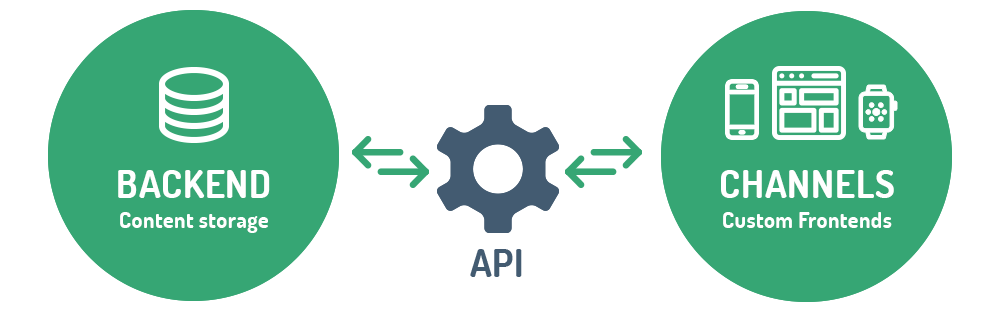
A headless CMS only delivers the backend: Your content in a database, and an admin interface to add and edit it. It's like a repository for your content.
You can get to this content via an API, but the CMS does not dynamically create your pages. No templates. No frontend delivery. In fact, a headless CMS does nothing until you ask it to give you the content you need via the API! You can plug any frontend tech you want.
Advantages of Headless
- Free choice of tech
- Flexible & scalable
- Reuse content for different frontends (like native apps, digital signage or manuals and other documents)
- Truly independent, flexible design (easier redesigns!)
- Secure, as your publishing env is not accessible
What is headless, what isn't?
Honestly, you can't draw a perfect line around Headless CMS. After all, traditional CMS like WordPress and Drupal are offering APIs now – are they also headless? Nope. They are not designed API-first (which is a term you might want to watch out for to understand different solutions). These CMS just added an API to use the content for other things as well, which is called decoupled rather than headless.
You'll see a lot of CMS vendors use the term headless, even if they aren't really. There are also a lot of grey areas, and special solutions. If you want to know more about different types of CMS, you can read up on the differences coupled, decoupled, hybrid and headless CMS!
Best headless CMS for Vue developers
We said before that you can use any frontend tech you want with a headless CMS – so why are some headless CMS better for Vue.js developers than others?
Extensibility! ✨
There are some headless CMS built on Vue, and you can extend them with modules yourself for added functionality, like f.ex. admin dashboards for custom reporting.
Storyblok
Storyblok is a pretty powerful headless CMS as a service solution built with Vue.js. It embraces the Atomic Design methodology, so it's built around the concept of reusable components. You can easily extend it with Vue.
Besides form-based admin interfaces, Storyblok also offers a visual composer that show your editors a preview of their changes on a website when editing content entries. This is truly a special piece of code magic for it to work together with their headless concept so well.
                        <video
                    muted
                    autoplay
                    playsinline
                    loop
                    class="brick__video">
                <source src="https://madewithnetworkfra.fra1.digitaloceanspaces.com/spatie-space-production/25164/storyblok-workflow-k.mp4" type="video/mp4">
            </video>


    </div>

    <div class="brick__caption">
                    <div class="brick__caption-upper">
            <a  href="https://madewithvuejs.com/storyblok" class="brick__title">
                Storyblok
            </a>
            <span class="brick__tagline">
            Headless CMS with Visual Editor
        </span>
        </div>
        <div class="brick__caption-lower">
            <div class="pull-left">

                                        <a href="/admin-tool">#Admin tool</a>
                                                                <a href="/saas">#SaaS</a>
                                                                <a href="/cms">#CMS</a>
                                                        </div>
            <div class="pull-right">
        <div class="brick__views">
        <svg class="svg-inline u__va--middle" width="20px" height="13px" viewBox="0 0 20 13" version="1.1" xmlns="http://www.w3.org/2000/svg" xmlns:xlink="http://www.w3.org/1999/xlink">
<!-- Generator: Sketch 46.2 (44496) - http://www.bohemiancoding.com/sketch -->
<title>icon-eye-dark</title>
<desc>Created with Sketch.</desc>
<defs></defs>
<g id="Page-1" stroke="none" stroke-width="1" fill="none" fill-rule="evenodd">
    <g id="Icons" transform="translate(-313.000000, -230.000000)" fill-rule="nonzero" fill="#435B71">
        <g id="icon-eye-dark" transform="translate(313.000000, 230.000000)">
            <path d="M9.57827924,0.0932647368 C5.40166592,0.0977121053 2.23909537,3.28527789 0.162366374,6.09013053 C-0.0164829778,6.33193046 -0.0164829778,6.66216481 0.162366374,6.90396474 C2.23923803,9.71401737 5.40085034,12.9011726 9.57827924,12.9068174 C9.57872397,12.9068178 9.57916871,12.9068178 9.57961345,12.9068174 C13.7562192,12.90237 16.9187977,9.71477 18.9955264,6.90995158 C19.1743758,6.66815165 19.1743758,6.3379173 18.9955264,6.09611737 C16.9186536,3.28603053 13.7570499,0.0989094737 9.57961345,0.0932647368 C9.57916871,0.0932643033 9.57872397,0.0932643033 9.57827924,0.0932647368 L9.57827924,0.0932647368 Z M9.57827924,1.46168579 L9.57961345,1.46168579 C12.8675916,1.46681737 15.5988249,3.96846211 17.5569468,6.50236737 C15.5985806,9.03230421 12.8660264,11.5341884 9.57961345,11.5383963 C6.29104758,11.5339489 3.55933568,9.03192789 1.60094367,6.49771474 C3.55930832,3.96777789 6.29185563,1.46589368 9.57827718,1.46168579 L9.57827924,1.46168579 Z" id="Shape"></path>
            <path d="M9.57894737,3.42075158 C7.88659608,3.42075158 6.5,4.80737263 6.5,6.49969895 C6.5,8.19205947 7.88659608,9.57864632 9.57894737,9.57864632 C11.2712987,9.57864632 12.6578947,8.19205947 12.6578947,6.49969895 C12.6578947,4.80737263 11.2712987,3.42075158 9.57894737,3.42075158 Z M9.57894737,4.78917263 C10.5317492,4.78917263 11.2894737,5.54690158 11.2894737,6.49969895 C11.2894737,7.45249632 10.5317492,8.21022526 9.57894737,8.21022526 C8.62614555,8.21022526 7.86842105,7.45249632 7.86842105,6.49969895 C7.86842105,5.54690158 8.62614555,4.78917263 9.57894737,4.78917263 Z" id="Shape"></path>
        </g>
    </g>
</g> </div>Directus
Directus has completely refactored their app from Backbone.js to Vue.js two years ago when they decoupled it from their API. They chose Vue especially to make it easier for developers to extend Directus (or contribute to it, as it's open-source).
It's designed to be modular, so you can deliver very customized solutions. Directus focuses on being as scalable as possible, so it fits small and big projects alike. You can self-host it, or use their cloud service to host it for you.
                        <video
                    muted
                    autoplay
                    playsinline
                    loop
                    class="brick__video">
                <source src="https://madewithnetworkfra.fra1.digitaloceanspaces.com/spatie-space-production/8360/directus2-k.mp4" type="video/mp4">
            </video>


    </div>

    <div class="brick__caption">
                    <div class="brick__caption-upper">
            <a  href="https://madewithvuejs.com/directus" class="brick__title">
                Directus
            </a>
            <span class="brick__tagline">
            Open-source Backend Toolkit
        </span>
        </div>
        <div class="brick__caption-lower">
            <div class="pull-left">

                                        <a href="/admin-tool">#Admin tool</a>
                                                                <a href="/saas">#SaaS</a>
                                                                <a href="/cms">#CMS</a>
                                                        </div>
            <div class="pull-right">
        <div class="brick__views">
        <svg class="svg-inline u__va--middle" width="20px" height="13px" viewBox="0 0 20 13" version="1.1" xmlns="http://www.w3.org/2000/svg" xmlns:xlink="http://www.w3.org/1999/xlink">
<!-- Generator: Sketch 46.2 (44496) - http://www.bohemiancoding.com/sketch -->
<title>icon-eye-dark</title>
<desc>Created with Sketch.</desc>
<defs></defs>
<g id="Page-1" stroke="none" stroke-width="1" fill="none" fill-rule="evenodd">
    <g id="Icons" transform="translate(-313.000000, -230.000000)" fill-rule="nonzero" fill="#435B71">
        <g id="icon-eye-dark" transform="translate(313.000000, 230.000000)">
            <path d="M9.57827924,0.0932647368 C5.40166592,0.0977121053 2.23909537,3.28527789 0.162366374,6.09013053 C-0.0164829778,6.33193046 -0.0164829778,6.66216481 0.162366374,6.90396474 C2.23923803,9.71401737 5.40085034,12.9011726 9.57827924,12.9068174 C9.57872397,12.9068178 9.57916871,12.9068178 9.57961345,12.9068174 C13.7562192,12.90237 16.9187977,9.71477 18.9955264,6.90995158 C19.1743758,6.66815165 19.1743758,6.3379173 18.9955264,6.09611737 C16.9186536,3.28603053 13.7570499,0.0989094737 9.57961345,0.0932647368 C9.57916871,0.0932643033 9.57872397,0.0932643033 9.57827924,0.0932647368 L9.57827924,0.0932647368 Z M9.57827924,1.46168579 L9.57961345,1.46168579 C12.8675916,1.46681737 15.5988249,3.96846211 17.5569468,6.50236737 C15.5985806,9.03230421 12.8660264,11.5341884 9.57961345,11.5383963 C6.29104758,11.5339489 3.55933568,9.03192789 1.60094367,6.49771474 C3.55930832,3.96777789 6.29185563,1.46589368 9.57827718,1.46168579 L9.57827924,1.46168579 Z" id="Shape"></path>
            <path d="M9.57894737,3.42075158 C7.88659608,3.42075158 6.5,4.80737263 6.5,6.49969895 C6.5,8.19205947 7.88659608,9.57864632 9.57894737,9.57864632 C11.2712987,9.57864632 12.6578947,8.19205947 12.6578947,6.49969895 C12.6578947,4.80737263 11.2712987,3.42075158 9.57894737,3.42075158 Z M9.57894737,4.78917263 C10.5317492,4.78917263 11.2894737,5.54690158 11.2894737,6.49969895 C11.2894737,7.45249632 10.5317492,8.21022526 9.57894737,8.21022526 C8.62614555,8.21022526 7.86842105,7.45249632 7.86842105,6.49969895 C7.86842105,5.54690158 8.62614555,4.78917263 9.57894737,4.78917263 Z" id="Shape"></path>
        </g>
    </g>
</g> </div>Headless CMS with Vue-support
There are of course a lot of other headless CMS (not #madewithvuejs) that might fit your needs and also offer very nice integrations. You can use any API-first CMS with Vue, of course.
But to get you started smoothly, check out these CMS that offer specific Vue guidance and SDKs:
- Contentful (offering a guide on how to integrate it with Vue & Nuxt)
- butterCMS (offering a Vue.js SDK, example project & integration guide)
- CosmicJS (offering a starter project & demo apps)
- Prismic (offering a starter project, guide for integrating it in existing projects and a lot of docs around Vue.js)
- Strapi.js (offering a starter and tutorials)
- Hygraph (offering Vue & Nuxt examples)
The decision of choosing a (headless) CMS is a hard one. The CMS space is a bit of a war-zone, honestly, and the almost unavoidable lock-in is something to keep in mind before choosing a solution. Take your time with the decision and evaluate what you need first.
Personally, we love the direction of headless as we value flexibility over anything 💚 If you have a story about a headless CMS that you particularly enjoyed working with together with Vue.js – we're curious! Tell us on Twitter @madewithvuejs or @arminulrich!